
Build your steps.
Set durations, efforts and recoveries. Use power targets to describe the session you want to ride.
A steady warm-up. A focused effort. Time to recover. Put the session together, then follow it one step at a time.
See a workoutPower targets guide a session; they are not medical advice.
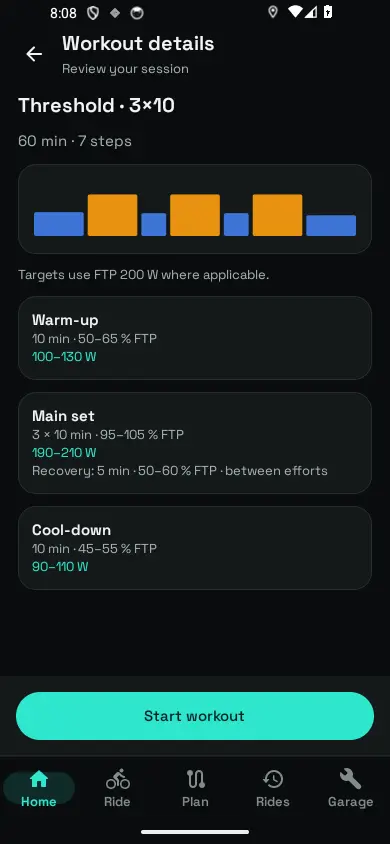
A plan you can follow
Set durations, efforts and recoveries. Use power targets to describe the session you want to ride.
See the current step and its target on the ride screen, alongside the information you need on the road.
Review the recorded ride to see how the session unfolded. Your surroundings and safety always come first.
One effort at a time
Set your FTP—functional threshold power—to scale percentage-based targets to your own training.
Phone-based power remains an approximation during a workout. For sessions that depend on measured watts, connect a compatible power meter.
This is an example session from the app, not a personalised training recommendation.
Threshold 3 × 10 Example workout
Questions, answered
You can use a phone-based power approximation without an external power sensor. Compatible Bluetooth sensors can add speed, cadence, heart rate or measured power. Use a power meter when your session requires measured watts.
You can set your FTP in the app and use it for percentage-based targets. Choose a value appropriate to you; the example workout and numbers on this website are not a fitness assessment.
The ride screen can show route guidance and the current workout step together. Plan a route that is appropriate for the session, and pause or adapt the effort whenever conditions require it.